The RTX 5060 is faster than the RTX 4060 for gaming, but the size of the improvement depends on the game and resolution. In TechSpot’s 18-game benchmark, the RTX 5060 was around 22% faster at 1080p and 27% faster at 1440p on average.
The RTX 5060 also gets faster GDDR7 memory, newer Blackwell architecture and DLSS 4 Multi Frame Generation support. However, both graphics cards have only 8GB VRAM.
For a new 1080p gaming PC, the RTX 5060 is generally the better choice at a reasonable price. If you already own an RTX 4060, upgrading directly to the RTX 5060 is harder to justify.
RTX 4060 vs RTX 5060: Quick comparison
The RTX 5060 replaces the RTX 4060 in NVIDIA’s mainstream 60-series lineup.
Both graphics cards target 1080p gaming, but the RTX 5060 has more CUDA cores and much faster memory bandwidth.
| Specification | RTX 4060 | RTX 5060 |
|---|---|---|
| Architecture | Ada Lovelace | Blackwell |
| CUDA cores | 3,072 | 3,840 |
| VRAM | 8GB | 8GB |
| Memory type | GDDR6 | GDDR7 |
| Memory interface | 128-bit | 128-bit |
| Memory bandwidth | 272 GB/s | 448 GB/s |
| Boost clock | 2.46 GHz | 2.50 GHz |
| Ray tracing cores | 3rd Gen | 4th Gen |
| Tensor cores | 4th Gen | 5th Gen |
| PCIe interface | PCIe 4.0 x8 | PCIe 5.0 x8 |
| Total graphics power | 115W | 145W |
| Launch MSRP | $299 | $299 |
NVIDIA lists the RTX 5060 with 3,840 CUDA cores, 8GB GDDR7 memory, a 128-bit memory interface and 145W Total Graphics Power. The RTX 4060 has 3,072 CUDA cores and 8GB GDDR6 memory.
The RTX 5060 therefore gives you more processing power without moving to a higher GPU class.
RTX 4060 vs RTX 5060 specifications
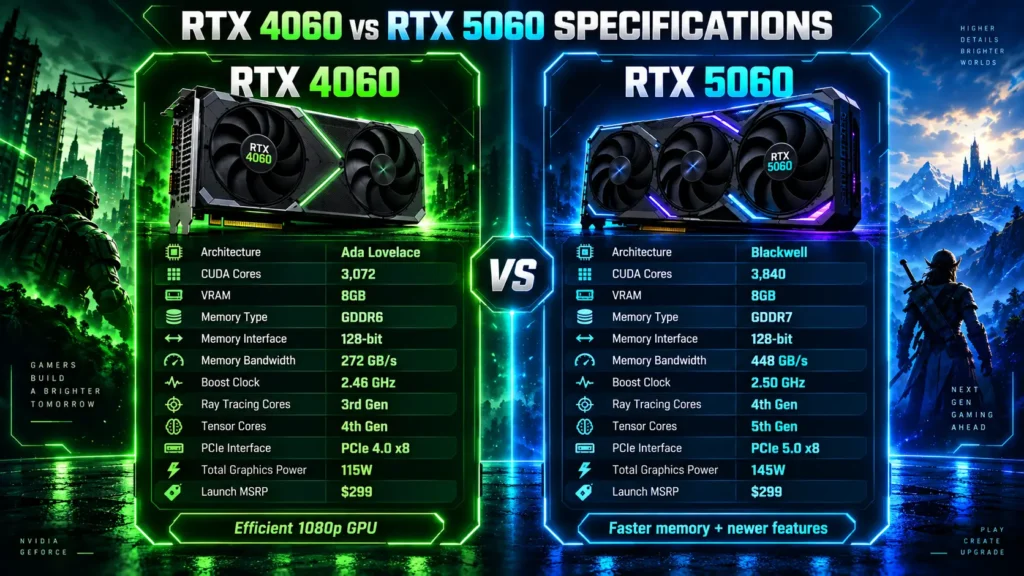
The most important changes are the Blackwell architecture, extra CUDA cores and GDDR7 memory.
Architecture and CUDA cores
The RTX 4060 uses NVIDIA’s Ada Lovelace architecture, while the RTX 5060 moves to Blackwell.
CUDA core count increases from 3,072 to 3,840.
That is a 25% increase in CUDA cores, although you should not expect every game to become exactly 25% faster.
Game performance also depends on memory behaviour, clock speed, CPU performance, drivers and the game engine.
GDDR6 vs GDDR7 memory
Memory is one of the largest hardware improvements.
The RTX 4060 has:
- 8GB GDDR6
- 128-bit memory bus
- 272 GB/s memory bandwidth
The RTX 5060 has:
- 8GB GDDR7
- 128-bit memory bus
- 448 GB/s memory bandwidth
That gives the RTX 5060 around 65% more memory bandwidth.
Higher bandwidth can help the GPU move game data faster, especially in bandwidth-sensitive workloads.
However, memory capacity remains unchanged at 8GB.
Faster GDDR7 memory cannot compensate for every situation where a game actually needs more than 8GB of VRAM.
RTX 4060 vs RTX 5060 gaming performance
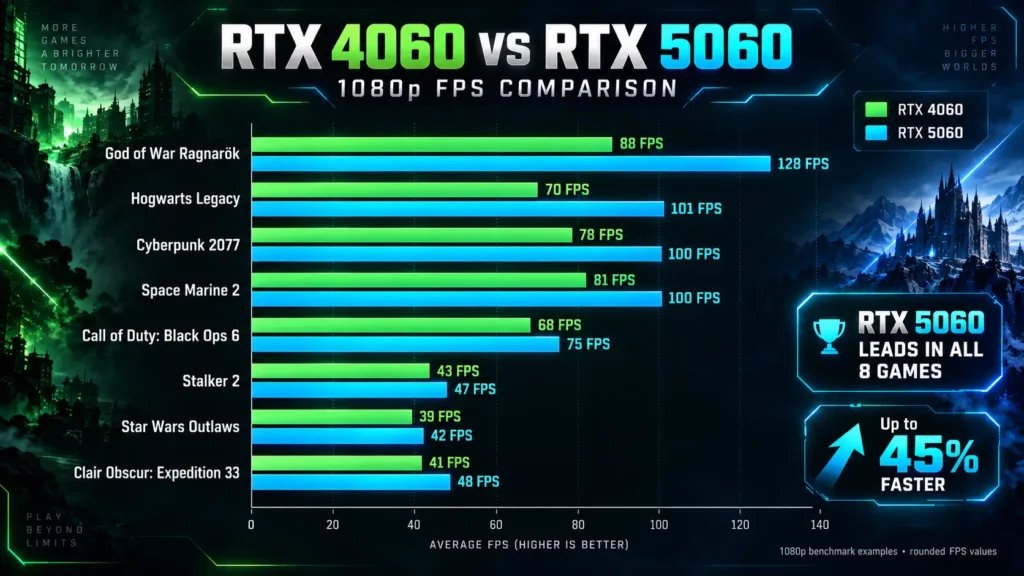
For a fair comparison, gaming benchmarks should focus primarily on conventional rendered performance.
Frame Generation and Multi Frame Generation can then be tested separately because generated frames are not the same as native rendered frames.
TechSpot tested the RTX 5060 across 18 games with ray tracing and upscaling disabled for its standard rasterisation comparison.
Across those games, the RTX 5060 was around 22% faster than the RTX 4060 at 1080p.
Here are several useful examples from the test:
| Game | RTX 5060 1080p FPS | Gain over RTX 4060 |
|---|---|---|
| God of War Ragnarök | 128 FPS | 45% |
| Hogwarts Legacy | 101 FPS | 44% |
| Cyberpunk 2077: Phantom Liberty | 100 FPS | 28% |
| Counter-Strike 2 | — | 27% |
| Space Marine 2 | 100 FPS | 23% |
| Clair Obscur: Expedition 33 | 48 FPS | 17% |
| Call of Duty: Black Ops 6 | 75 FPS | 10% |
| Stalker 2 | 47 FPS | 9% |
| Star Wars Outlaws | 42 FPS | 8% |
The important point is that the RTX 5060 does not deliver the same improvement in every game.
God of War Ragnarök showed a large 45% gain, while Black Ops 6 improved by only 10%.
This is why one percentage should not be used to predict the exact FPS improvement in every game.
Also read: How to Increase FPS in Games: 15 Easy Ways
Benchmark methodology note
These figures come from TechSpot’s RTX 5060 testing and should be used as comparative results rather than guaranteed FPS for every gaming PC.
Actual performance can change depending on:
- CPU
- RAM
- Graphics preset
- Game version
- GPU drivers
- Background applications
- Cooling
- Resizable BAR support
The most useful number for comparing the GPUs is therefore the relative performance difference under the same test conditions.
RTX 4060 vs RTX 5060 at 1440p
The RTX 5060 can run games at 1440p, but 1080p remains a more natural target for this class of GPU.
In TechSpot’s 18-game average, the RTX 5060 was around 27% faster than the RTX 4060 at 1440p.
Cyberpunk 2077: Phantom Liberty averaged 66 FPS on the RTX 5060 at 1440p, giving it a 35% advantage over the RTX 4060.
God of War Ragnarök showed a 32% improvement, while Space Marine 2 was 33% faster.
Star Wars Jedi: Survivor averaged 57 FPS and was around 30% faster than the RTX 4060.
Those results show that the RTX 5060 can provide useful 1440p performance.
The problem is VRAM.
Some demanding games struggle when 8GB is not enough for the selected resolution and quality settings.
TechSpot observed severe VRAM-related problems in games such as Stalker 2 and The Last of Us Part I under demanding 1440p settings.
That does not make the RTX 5060 unusable at 1440p.
You may simply need to reduce settings such as:
- Texture quality
- Ray tracing
- Shadow quality
- Geometry detail
- Resolution scaling
For esports and less demanding games, 1440p should be much easier to handle.
Ray tracing performance: RTX 4060 vs RTX 5060
The RTX 5060 has NVIDIA’s 4th-generation RT cores, while the RTX 4060 uses 3rd-generation RT cores.
The newer GPU generally performs better with ray tracing enabled.
TechSpot tested several ray-traced games.
In Alan Wake 2 at 1080p using DLSS Quality, the RTX 5060 averaged 36 FPS and was around 20% faster than the RTX 4060.
Dying Light 2 reached around 72 FPS at upscaled 1080p with the high ray tracing preset. That made the RTX 5060 almost 30% faster than the RTX 4060.
Cyberpunk 2077 could approach 60 FPS at 1080p using DLSS with the Ultra RT preset.
Ray tracing at 1440p is much more demanding.
For this GPU class, using DLSS and carefully chosen ray tracing settings is generally more practical than simply enabling maximum settings.
DLSS 4 vs DLSS 3
The RTX 5060 also has a feature advantage over the RTX 4060.
Both cards can use DLSS technologies, but RTX 50-series GPUs support DLSS 4 Multi Frame Generation.
Multi Frame Generation can generate additional frames between conventionally rendered frames in supported games. NVIDIA introduced this feature as part of its Blackwell RTX 50-series platform.
This can make the displayed frame rate much higher.
However, generated FPS should be kept separate from native gaming performance.
For example, a game producing 70 conventionally rendered FPS and then showing a much higher output with Multi Frame Generation has not suddenly gained the same increase in native rendering performance.
When comparing GPUs, look at:
Native or standard rasterised FPS
DLSS Super Resolution performance
Frame Generation performance
Multi Frame Generation performance
This gives a more useful picture of actual GPU performance.
Is 8GB VRAM enough for the RTX 4060 and RTX 5060?
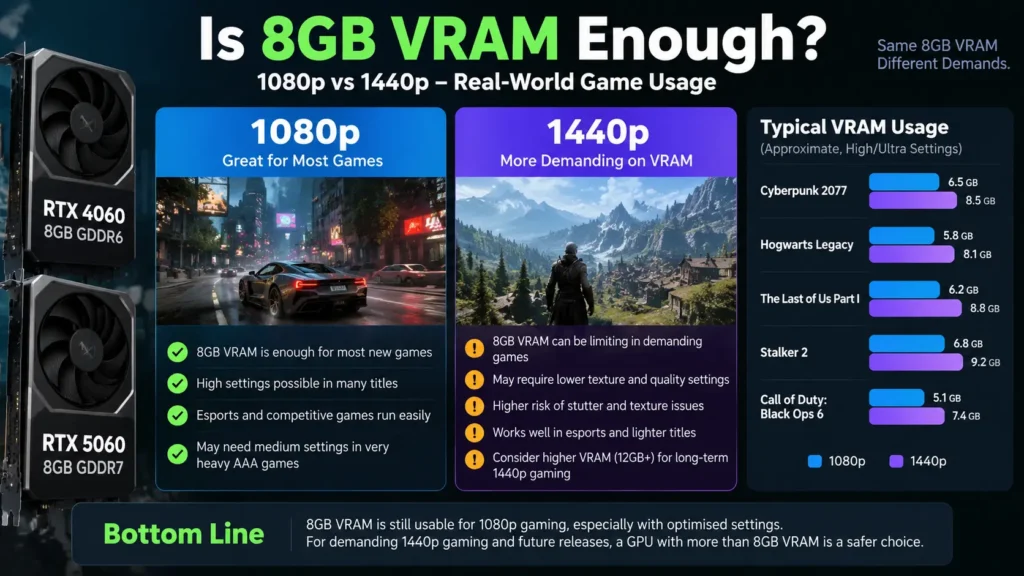
Both graphics cards have 8GB VRAM.
For many 1080p games, that remains usable.
The limitation becomes more noticeable when you combine high-resolution textures with demanding graphics settings.
VRAM usage can increase with:
- 1440p gaming
- Ultra textures
- Ray tracing
- High geometry settings
- Large open-world environments
- Texture mods
The RTX 5060 has substantially more memory bandwidth than the RTX 4060, but it still has only 8GB available.
TechSpot found examples where the RTX 5060’s 8GB buffer created problems at demanding 1440p settings, including poor frame times or texture-related issues.
For 1080p gamers willing to adjust settings when required, this is less serious.
For someone building a PC primarily for demanding AAA gaming at 1440p over several years, a GPU with more VRAM may be a better long-term choice.
RTX 4060 vs RTX 5060 power consumption
The RTX 4060 has a clear advantage in power consumption.
Its rated Total Graphics Power is 115W.
The RTX 5060 increases this to 145W.
That is 30W higher, or roughly a 26% increase in rated graphics power.
NVIDIA recommends a 550W system power supply for the RTX 5060, although the correct PSU size also depends on the rest of your PC.
The RTX 4060 therefore remains attractive for:
- Compact gaming PCs
- Low-power systems
- Older prebuilt PCs
- Quiet gaming builds
- Systems with limited PSU capacity
For a normal modern gaming desktop, however, the RTX 5060’s additional 30W is unlikely to be a major issue.
RTX 4060 vs RTX 5060 price and value
Both GPUs launched with a $299 MSRP.
NVIDIA lists the RTX 5060 launch MSRP at $299, while the RTX 4060 also entered the market at $299.
At the same price, the RTX 5060 is easily the better choice.
You get:
- Higher gaming performance
- GDDR7 memory
- 448 GB/s memory bandwidth
- Blackwell architecture
- Newer ray tracing hardware
- Newer Tensor cores
- DLSS 4 Multi Frame Generation
RTX 4060 vs RTX 5060 price in India
Indian GPU prices vary considerably between brands, cooler designs, stock levels and retailers.
As checked on September 10, 2026, PrimeABGB listings showed several RTX 4060 models around roughly ₹30,000–₹35,000, although many of those listings were out of stock.
RTX 5060 listings showed a much wider range. Some lower-priced models were listed around the mid-₹30,000 range but were out of stock, while available premium models could exceed ₹50,000.
That makes the exact model price more important than the GPU name alone.
A ₹34,000 RTX 5060 and a ₹55,000 RTX 5060 provide almost the same basic GPU performance, so paying a very large premium only for a premium cooler usually hurts value.
Prices also change frequently, so check live retailer pricing before buying.
How to compare GPU value
A simple calculation is:
Cost per frame = GPU price ÷ average FPS
Lower cost per frame means you are paying less for each frame of gaming performance.
However, cost per frame does not include every factor.
You should also consider:
- VRAM
- Ray tracing
- DLSS support
- Power consumption
- Warranty
- Cooler quality
- Current availability
If the RTX 4060 is only slightly cheaper than the RTX 5060, the RTX 5060 is usually the better purchase.
A heavily discounted RTX 4060 can still make sense for a budget 1080p build.
Should you upgrade from RTX 4060 to RTX 5060?
This is different from choosing between the two cards for a new PC.
TechSpot’s 18-game test found the RTX 5060 around 22% faster at 1080p on average.
That improvement is noticeable.
But you still move from an 8GB GPU to another 8GB GPU.
For most RTX 4060 owners, that makes the RTX 5060 a relatively small same-tier upgrade.
Upgrading may make sense if:
- You can sell your RTX 4060 for a good price
- Your actual upgrade cost is small
- You want Multi Frame Generation
- You need approximately 20–30% more performance
- You mainly play at 1080p
Keeping the RTX 4060 makes more sense if:
- Your games already run smoothly
- You want a major performance improvement
- You are moving to demanding 1440p gaming
- You want more than 8GB VRAM
- The RTX 5060 is expensive in your market
For many RTX 4060 owners, saving for a faster GPU with more VRAM would provide a more meaningful upgrade.
RTX 4060 vs RTX 5060: Which should you buy?
Here is the simple answer:
| User type | Better choice |
|---|---|
| Building a new 1080p gaming PC | RTX 5060 |
| Already owns an RTX 4060 | Keep RTX 4060 in most cases |
| Competitive gaming | RTX 5060 |
| Ray tracing gaming | RTX 5060 |
| Wants Multi Frame Generation | RTX 5060 |
| Low-power gaming PC | RTX 4060 |
| RTX 4060 available at a large discount | RTX 4060 can make sense |
| Heavy AAA 1440p gaming | Consider a higher-VRAM GPU |
For a new buyer, choose the RTX 5060 when pricing is close.
It is faster and provides newer graphics features.
For an existing RTX 4060 owner, the decision is different.
A roughly 22% average 1080p performance increase is useful, but probably not enough to justify replacing a recent GPU unless the upgrade costs you very little.
Final verdict
The RTX 5060 is the better gaming GPU than the RTX 4060.
In TechSpot’s 18-game test, it delivered around 22% higher average performance at 1080p and 27% higher performance at 1440p. Individual games showed considerably different results.
It also offers:
- 25% more CUDA cores
- GDDR7 memory
- Around 65% more memory bandwidth
- Blackwell architecture
- Newer ray tracing hardware
- DLSS 4 Multi Frame Generation
Its biggest weakness is the unchanged 8GB VRAM capacity.
For a new 1080p gaming PC, the RTX 5060 is the better option when you can find it at a sensible price.
For gamers who already own an RTX 4060, upgrading directly to an RTX 5060 usually offers too small a jump. Waiting for a faster GPU, preferably with more VRAM, will make more sense for many users.
FAQ
How much faster is the RTX 5060 than the RTX 4060?
TechSpot’s 18-game benchmark found the RTX 5060 around 22% faster than the RTX 4060 at 1080p and around 27% faster at 1440p on average. Performance varies between individual games.
Is RTX 5060 better than RTX 4060 for 1080p gaming?
Yes. The RTX 5060 offers higher gaming performance, faster GDDR7 memory and newer Blackwell features. At similar prices, it is the better option for a new 1080p gaming PC.
Is RTX 5060 good for 1440p gaming?
The RTX 5060 can handle many games at 1440p, especially with optimised settings and DLSS. Its 8GB VRAM can become a limitation in demanding AAA games using high settings.
Does RTX 5060 have more VRAM than RTX 4060?
No. Both graphics cards have 8GB VRAM. The RTX 5060 uses faster GDDR7 memory, while the RTX 4060 uses GDDR6.
Does RTX 5060 support DLSS 4?
Yes. The RTX 5060 supports NVIDIA’s DLSS 4 features, including Multi Frame Generation in supported games.